

If you're getting into app development or web development, there's one term you can't avoid: API. It stands for "Application Programming Interface" - a programming interface that lets software talk to other software. Sounds intimidating, but you can understand it in five minutes. Let me show you how.
Video: What Is an API?

Quick Summary
- An API (Application Programming Interface) is a standardized interface that lets two programs communicate with each other
- APIs follow the request-response principle: you ask for something, you get an answer back
- The three most important API types are REST, GraphQL, and SOAP
- Without APIs, modern app development would be impossible - they connect frontend, backend, and external services
- You use dozens of APIs every day without even realizing it
The Restaurant Waiter
Before we get technical, here's an image that clicks immediately.
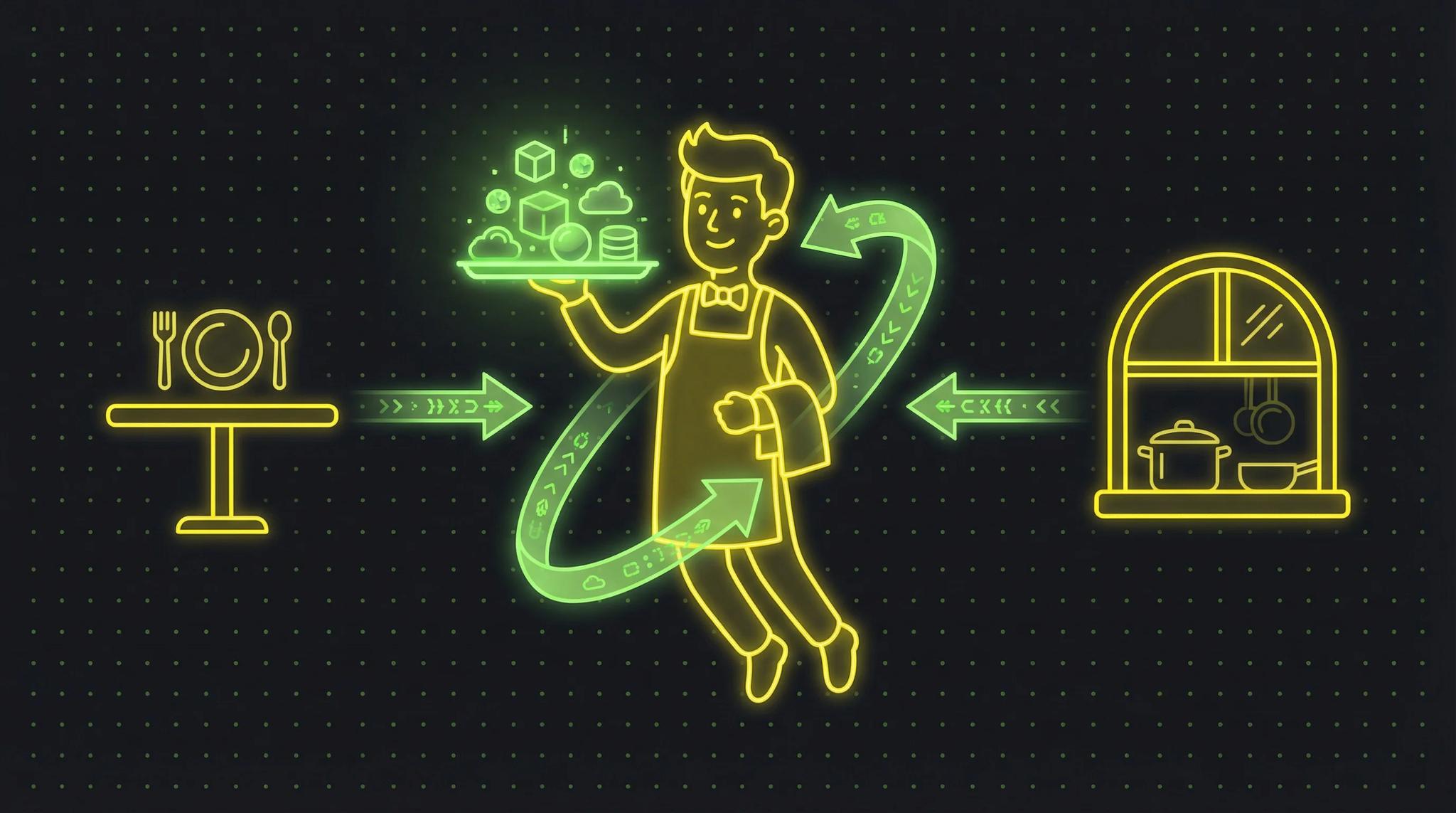
Picture a restaurant. You're sitting at your table and you're hungry. In the kitchen, the chefs can prepare any dish. But you can't just walk into the kitchen and cook something yourself. You need a go-between: the waiter.
The waiter takes your order, brings it to the kitchen, waits until the food is ready, and brings it to your table. The waiter is the interface between you and the kitchen.
That's exactly what an API is. It's the waiter between two software systems.
- You (the guest) = the program that needs data (e.g., an app)
- The kitchen = the system that has data (e.g., a server or database)
- The waiter = the API that receives requests and brings back responses
You don't need to know how the kitchen works. You don't need to know which pots are used or where the ingredients come from. You tell the waiter what you want, and they handle the rest. Same with an API - you don't need to know how the other system works internally. You send a request, you get a response.
What Exactly Is an API?
An API - Application Programming Interface, or programming interface - is a defined set of rules and protocols that allow different software programs to communicate with each other. It's sometimes called a "software to software interface" because it's not about communication between humans and computers, but between computer and computer.
Imagine you're building a weather app. You want to show the current weather in Berlin. You could set up your own weather station, read sensors, and process the data. Or you use a weather API. It says: "Send me the city name, and I'll send you back the temperature, humidity, and forecast."
That's the core of API programming: you leverage existing systems instead of building everything yourself.
Every API has documentation - basically the restaurant's menu. It tells you:
- What requests you can make (endpoints)
- What data you need to include (parameters)
- What you'll get back (response)
- What rules apply (authentication, limits)
If you're wondering how frontend and backend communicate with each other - the answer is, in most cases: through an API.
How Does an API Work?
The basic principle is simple: request and response.
Step 1: The Request
Your program (the client) sends a request to the API. This request includes:
- The URL (where the request goes, e.g.,
https://api.weather.com/berlin) - The method (what you want to do: get data, create, update, or delete)
- Optionally: data (e.g., search terms, filters, authentication)
Step 2: Processing
The server receives the request, checks if you're authorized, processes the request, and prepares the response. This is the kitchen preparing your dish.
Step 3: The Response
The server sends a response back. It includes:
- A status code (200 = all good, 404 = not found, 500 = server error)
- The data (usually in JSON format)
That's it. That's the basic principle. Every API, no matter how complex, is built on this pattern. In my article about how my production app's backend works, you can see how APIs work together in a real architecture. A common use case for APIs: social login where your app communicates with Google or Apple authentication servers.
HTTP Methods
With REST APIs, there are four main methods you should know:
| Method | What It Does | Restaurant Analogy |
|---|---|---|
| GET | Retrieve data | "What's on the menu?" |
| POST | Create new data | "I'll order the steak" |
| PUT | Update existing data | "Actually, without the sauce" |
| DELETE | Delete data | "Cancel my order" |
API Types: REST vs. GraphQL vs. SOAP
Not every API works the same way. There are different architectural styles, and the three most common ones are REST, GraphQL, and SOAP.
REST API
REST stands for "Representational State Transfer" and is by far the most popular API type. When someone says "API," they usually mean a REST API.
How does REST work?
Every resource (user, article, product) has its own URL. You access them using HTTP methods.
GET /users- Get all usersGET /users/42- Get user with ID 42POST /users- Create a new userDELETE /users/42- Delete user 42
REST is simple, widely adopted, and well-documented. That's why I use REST for most projects.
GraphQL
GraphQL was developed by Facebook and solves a problem that REST has: you always get exactly the data you need. No more, no less.
The problem with REST: You ask for a user profile and get 50 fields back, but you only need the name and profile picture. That's wasted bandwidth, especially on mobile devices.
GraphQL solves this: You specify exactly which fields you want:
query {
  user(id: 42) {
    name
    profilePicture
  }
}
And you only get that back. Nothing more, nothing less.
GraphQL is more powerful but also more complex to set up. For apps with many different data views, it's great. For simple CRUD applications, it's often overkill.
SOAP
SOAP (Simple Object Access Protocol) is the dinosaur among API types. It uses XML instead of JSON and has strict standards.
Today you'll mainly find SOAP in large enterprises, banks, and insurance companies. If you work with SAP or other enterprise systems, you'll probably encounter SOAP.
For modern app development, SOAP is usually too cumbersome. I recommend REST or GraphQL.
Comparison Table
| Property | REST API | GraphQL | SOAP |
|---|---|---|---|
| Data format | JSON | JSON | XML |
| Flexibility | Fixed endpoints | Client defines the data | Strictly defined |
| Learning curve | Low | Medium | High |
| Performance | Good | Very good (less data) | Heavy |
| Adoption | Very high | Growing | Declining |
| Ideal for | Most apps | Complex, data-heavy apps | Enterprise & legacy |
| Caching | Simple | Complex | Complex |
REST API Example in Practice
Enough theory, let's get practical. Here's what a real API call looks like. Let's say you want to fetch a user from an API.
With curl (Terminal)
curl https://api.example.com/users/42 \
  -H "Authorization: Bearer your-api-key"
With JavaScript (fetch)
const response = await fetch('https://api.example.com/users/42', {
  headers: {
    'Authorization': 'Bearer your-api-key'
  }
});

const user = await response.json();
console.log(user.name); // "Max Mustermann"
The Response
{
  "id": 42,
  "name": "Max Mustermann",
  "email": "max@example.com",
  "created_at": "2026-01-15T10:30:00Z"
}
That's essentially all there is to it. You send a request, you get structured data back. Your frontend can then display that data. That's how every modern app works.
Why Are APIs Important for App Development?
Short answer: no APIs, no modern apps.
1. Connecting Frontend and Backend
Your frontend - the app on your phone or the website in your browser - needs to communicate with the backend somehow. Logging users in, loading data, placing orders. All of this happens through APIs.
2. Integrating External Services
Want to accept payments? Stripe API. Send push notifications? Firebase API. Determine location? Google Maps API. Send emails? SendGrid API.
Instead of building everything yourself, you use existing APIs. This saves months of development time.
3. Enabling Microservices
Modern backend architectures consist of many small services that communicate with each other through APIs. The user service talks to the notification service, which talks to the email service. Each does one thing well. I showed what this looks like in practice in my article about my backend architecture.
4. Platform Independence
A well-designed API can be called from anywhere. The same API serves your iOS app, your Android app, and your website. You build the backend once and can use it from everywhere.
5. Scalability
With APIs, different parts of your system can scale independently. If the user service is under more load, you only scale that one up, not the entire app.
Common API Terms Explained
When you work with APIs, you'll stumble across some jargon. Here are the most important terms:
Endpoint
An endpoint is a specific URL you send requests to. For example, https://api.example.com/users. Each endpoint is tied to a specific resource or action.
Request / Response
A request is your call to the API. A response is the answer. That's all there is to it - back and forth.
Authentication
Most APIs are protected. You need a key (API key) or token to identify yourself. Like a VIP pass at the entrance. No pass, no entry.
Common methods:
- API Key: A simple key you send with every request
- OAuth 2.0: A more complex system where users grant the app access to their data (e.g., "Sign in with Google")
- JWT (JSON Web Token): An encrypted token containing user information
Rate Limiting
APIs limit how many requests you can make within a time period. For example: maximum 100 requests per minute. This protects the server from being overwhelmed.
If you hit the limit, you'll get a 429 status code ("Too Many Requests"). Then you need to wait before making the next request.
JSON
JSON (JavaScript Object Notation) is the standard format for API data. It looks like this:
{
  "name": "Max",
  "age": 30,
  "hobbies": ["coding", "coffee"]
}
Readable by humans, easy for machines to parse. That's why JSON has replaced XML in most APIs.
Status Codes
HTTP status codes tell you whether your request was successful:
- 200 - OK, all good
- 201 - Created, new resource was made
- 400 - Bad request, you sent something wrong
- 401 - Unauthorized, your API key is wrong
- 403 - Forbidden, you don't have permission
- 404 - Not found
- 429 - Too many requests (rate limit)
- 500 - Server error, problem on the other end
APIs in Everyday Life
You use APIs all the time, even if you don't realize it. A few examples:
- Weather app: Fetches weather data from a weather API
- Embedded Google Maps: Uses the Google Maps API
- Social login ("Sign in with Google"): Uses Google's OAuth API
- Online banking: Your banking app communicates with the bank via APIs
- Spotify: The app fetches playlists, songs, and recommendations via API
- Online shopping: The web store communicates with the payment provider and shipping service via APIs
Every time an app loads data from the internet, there's an API behind it.
API Design: What Makes a Good API?
If you're building APIs yourself, or want to give your dev team feedback, here are a few principles that matter:
Consistency
Endpoints should follow a logical structure. If /users/42 returns a user, then /products/42 should return a product. Same patterns, same logic.
Good Error Messages
Instead of just "Error," the API should explain what exactly went wrong:
{
  "error": "validation_failed",
  "message": "The 'email' field is required",
  "field": "email"
}
Versioning
APIs change over time. To prevent existing apps from breaking, you use versioning: /v1/users and /v2/users can exist in parallel.
Documentation
An API without documentation is like a restaurant without a menu. Nobody knows what's available. Good docs include examples, error codes, and explanations for every endpoint.
Frequently Asked Questions
No, the basic concept is simple: request in, response out. To actually use or build APIs yourself, you need programming skills. But to understand what APIs are and what they're for, common sense is enough. You can talk to the waiter at a restaurant without being a chef yourself.
APIs can be very secure when implemented properly. Encryption (HTTPS), authentication (API keys, OAuth), rate limiting, and input validation are standard practices. A poorly secured API is a security risk though. So API security is something you should think about from the start.
Many APIs offer free base plans. The Google Maps API has a free quota, the OpenWeatherMap API is free for low usage. Beyond a certain usage level, costs vary by provider. Running your own APIs costs server resources that you should factor into your ongoing costs.
For most projects, REST is the better choice. It's simpler, there are more resources and tutorials, and most external APIs are REST. GraphQL is worth it when you have many different data views and want to optimize data transfer, for example in complex mobile apps. When in doubt: start with REST.
First, think about what functionality you need: payments, email delivery, weather data? Then search for providers. Platforms like RapidAPI list thousands of APIs. Look for: good documentation, reliable uptime, fair pricing, and active support. And test the API with Postman or curl before integrating it into your project.
Yes, and it's often necessary. As soon as your app needs a backend, you're automatically building an API. Frameworks like Express (Node.js), FastAPI (Python), Serverpod (Dart), or NestJS make getting started easy. Begin with a simple REST API and expand as needed.
