
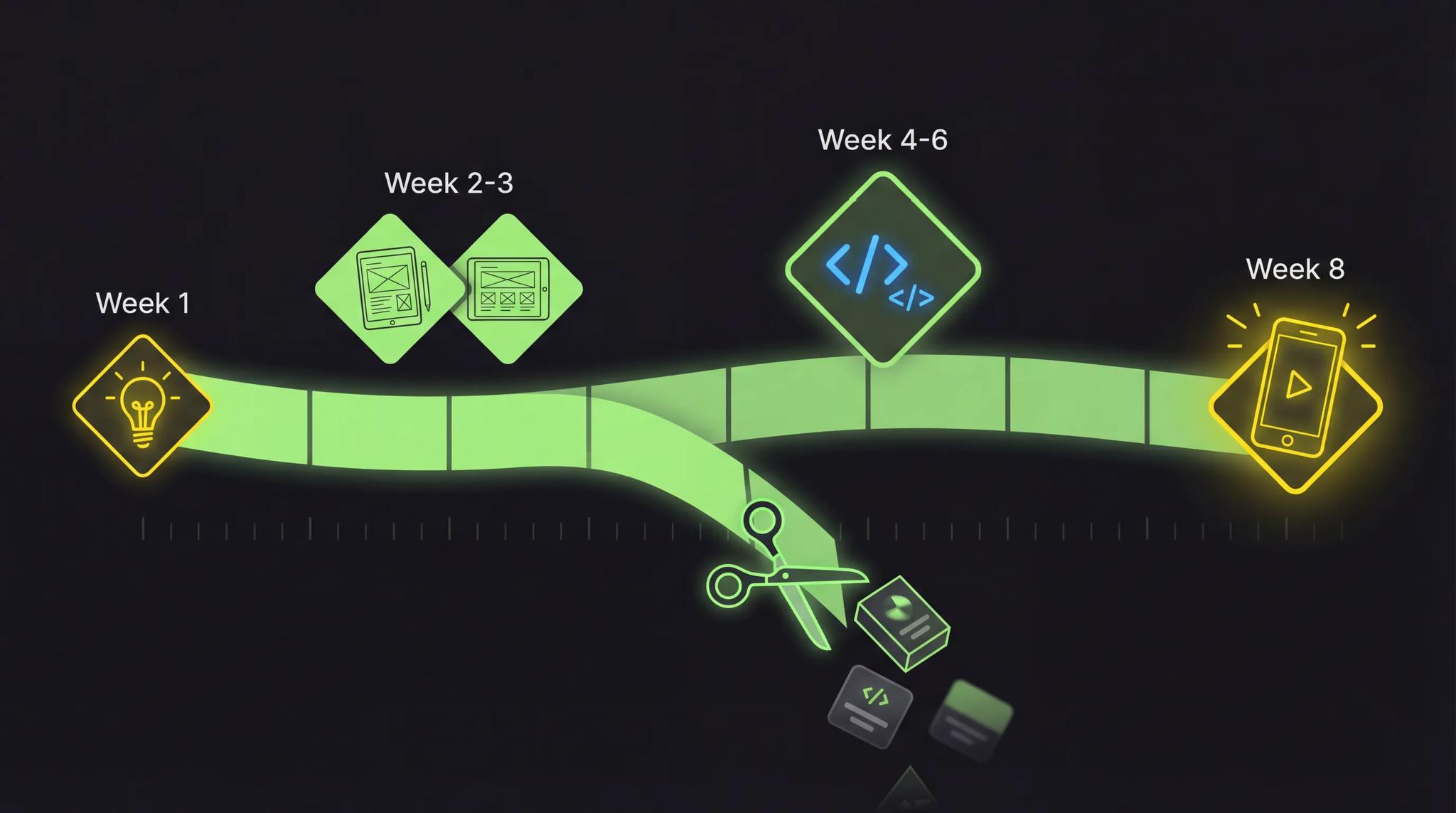

You have an app idea. A really good one, even. You could spend six months building the perfect product. Design everything, implement every feature, cover every edge case. Or you could test your idea in eight weeks and know whether it flies. I know which option I would pick, and after dozens of projects as a freelance app developer, I can tell you: the second option wins almost every time.
Quick Summary
- MVP development does not mean building a bad app, it means testing your riskiest assumption as fast as possible
- In 8 weeks you can go from idea to testable prototype if you stay focused
- MVP costs typically range from 5,000 to 15,000 euros, a fraction of a fully built app
- The most common mistakes: too many features, no user research, and perfectionism
- An MVP is your cheapest way to convince investors and get real user feedback
What Is an MVP Really?
MVP stands for Minimum Viable Product, the minimum functional product. But this is often misunderstood. An MVP is not a half-finished prototype riddled with bugs. It is also not the first version of your app with stripped-down features.
An MVP is the smallest version of your product that tests your riskiest assumption.
Imagine you want to open a restaurant. You could invest 500,000 euros in a location, install a kitchen, hire staff, and then hope people show up. Or you start with a food truck. Same recipes, same quality, but with minimal investment. You test the location, the menu, and your audience before committing long-term.
That is exactly what an MVP is: your food truck before you open the restaurant.
The focus is on a single question: Are there people willing to pay for this solution? Everything else, the fancy design, push notifications, dark mode, comes after.
Why an MVP? The Arguments That Matter
1. Validate Instead of Speculate
90% of all startups fail. Not because the technology fails, but because nobody needs the product. An MVP lets you answer that question before you have burned through your budget. Here I show you how to validate your app idea upfront.
2. Convince Investors
No investor wants to see a pitch deck. Investors want traction. With an MVP you can show real numbers: downloads, active users, conversion rates. That is a thousand times more convincing than any PowerPoint.
3. Early User Feedback
Your assumptions about your users are most likely wrong. In my experience, 80% of users use an app differently than expected. The earlier you find that out, the better. Ship faster instead of perfecting, that is the principle that separates successful apps from eternal projects.
4. Fail Cheaply
If your idea does not work, you have lost 8,000 euros and 8 weeks, not 100,000 euros and 12 months. That is the difference between a learning moment and a catastrophe.
The 8-Week Plan: How to Build Your MVP
I have refined this process across dozens of projects. It works for most app ideas, whether B2C or B2B.
Weeks 1-2: Validate Idea & Concept
Before a single line of code is written, three things need to happen:
User Interviews (5-10 Conversations)
Talk to real people from your target audience. Not family, not friends, strangers who have the problem you want to solve. The most important question: "How do you solve this problem today?"
Competitor Analysis
Look at what already exists. Not to copy, but to understand: What is missing? What annoys users about existing solutions? Those are your entry points.
Feature Prioritization with MoSCoW
Sort all features into four categories:
| Category | Meaning | Example |
|---|---|---|
| Must Have | The app does not work without it | Core feature, login |
| Should Have | Important but not critical | Profile page, settings |
| Could Have | Nice if time permits | Dark mode, sharing |
| Won't Have | Comes in v2.0 | AI features, social feed |
Only the Must-Haves go into the MVP. Everything else goes on the roadmap. Here I explain in detail what really belongs in an MVP.
Week 3: Design & Wireframes
Now it gets visual. In Figma I create:
- User flows: How does the user move through the app? From opening to the core function, three taps maximum.
- Wireframes: Rough layouts of all screens. No colors, no images, just structure.
- Clickable prototype: An interactive mockup you can show to real users and test.
The prototype is worth its weight in gold. You get feedback on navigation and functionality before you write a single line of code. That saves weeks of development time.
Weeks 4-6: Development
Now we build. For me that means: Flutter + Firebase.
Why? Flutter gives you one codebase for iOS and Android simultaneously. Firebase provides auth, database, and push notifications out of the box. That saves a solid 30-40% of development time compared to native code.
// Example: Firebase Auth in Flutter, login in just a few lines
import 'package:firebase_auth/firebase_auth.dart';

Future<UserCredential> signInWithEmail(String email, String password) async {
  return await FirebaseAuth.instance.signInWithEmailAndPassword(
    email: email,
    password: password,
  );
}
The focus during these three weeks is exclusively on the core function. No onboarding tutorial, no elaborate settings menu, no gamification. Just the one feature your app exists for.
More on why I rely on Flutter in my article about app development costs 2026.
Week 7: Testing & Bug Fixing
One week dedicated entirely to quality:
- Functional tests: Does everything work as planned?
- Device tests: Does the app look good on different screen sizes?
- Performance: Does the app load fast enough? Any stuttering?
- Beta testing: 10-20 test users from your target audience giving real feedback
Bugs in the core function get fixed. Cosmetic issues go on the list for v1.1.
Week 8: Launch & First Feedback
The most exciting part. Your app goes into the stores, or via TestFlight/Firebase App Distribution to your first users.
What you track now:
- How many users sign up?
- How many use the core function?
- How many come back the next day?
- Where do users drop off?
These numbers are your compass for everything that comes next.
What Belongs in the MVP, and What Does Not?
The hardest decision in MVP development: what stays out?
| Must-Have | Nice-to-Have | Overkill for v1.0 |
|---|---|---|
| Core function | Push notifications | AI-powered features |
| User registration | Profile picture upload | Social features (feed, comments) |
| Simple navigation | Dark mode | Multi-language support |
| Basic design | Onboarding tutorial | Analytics dashboard for users |
| Error handling | Offline mode | In-app chat |
| Basic settings | Sharing function | Gamification |
The rule of thumb: if a feature does not directly test your riskiest assumption, it does not go into the MVP.
MVP Costs: What You Should Realistically Budget
The question I hear most often: "What does it cost to have an MVP built?"
Here are my honest numbers as a freelancer:
5,000, 8,000 Euros: The Basic MVP
- 3-5 screens
- One core function
- Firebase backend (auth + database)
- Simple, clean design
- iOS + Android with Flutter
- 4-6 weeks development time
Suitable for: Initial validation, investor pitch, proof of concept
8,000, 12,000 Euros: The Solid MVP
- 6-10 screens
- Core function + 2-3 supporting features
- Custom design from Figma template
- Payment integration (Stripe/RevenueCat)
- Push notifications
- 6-8 weeks development time
Suitable for: App Store launch, first paying customers, seed funding
12,000, 15,000 Euros: The Launch-Ready MVP
- 10-15 screens
- Mature core function with supporting features
- Professional UI/UX design
- Admin dashboard (web)
- Analytics integration
- 8-10 weeks development time
Suitable for: Market entry, scalable foundation, Series A preparation
For comparison: a fully built app quickly costs 40,000 to 150,000 euros. An MVP is always the smarter starting point.
MVP Mistakes I See Constantly
After dozens of MVP projects, I know the pitfalls. Here are the most common ones:
Mistake 1: Too Many Features
The classic. "But we absolutely need Feature X!", No, you do not. Not right now. Every feature you add extends development by days to weeks and dilutes your focus.
Mistake 2: No User Research
You are not your user. I have seen projects where founders developed for months without once speaking to their target audience. The result: a technically flawless app that nobody wanted.
Mistake 3: Perfectionism
Your MVP does not have to be perfect. It has to be good enough to test your core hypothesis. If you do not feel a little uncomfortable when you release it, you waited too long.
Mistake 4: Wrong Tech Stack
An MVP with microservices architecture, Kubernetes, and custom ML models? Please do not. Use proven, fast solutions: Flutter for the app, Firebase or Supabase for the backend, done. You can always restructure the architecture later, once you know your product works.
Mistake 5: No Feedback Loop
Launching your MVP and then doing nothing for three months is not a plan. From day one you need a mechanism to collect user feedback and act on it. Whether in-app feedback, user interviews, or analytics, the point is that you listen.
Conclusion
If you have an app idea, getting an MVP built is the best way to start. You test your assumptions with minimal risk, get real feedback from real users, and skip months of building features that nobody might actually need.
The 8-week plan works. Not because it is magic, but because it forces you to stay focused. Two weeks concept, one week design, three weeks development, one week testing, one week launch. Your minimum viable product is standing, and you have real data to build on.
Think of the food truck: before you open the restaurant, test the menu. If the line at the truck is long enough, you know the investment is worth it.
Frequently Asked Questions
For most app ideas, the realistic timeframe is 6 to 10 weeks. The exact effort depends on the scope of features. A very focused MVP with one core function I can often deliver in 4-6 weeks. If custom design, payment integration, or an admin dashboard are added, plan for 8-10 weeks. What matters most is clearly defining what goes into the MVP before you start, that saves weeks of detours.
MVP costs typically range from 5,000 to 15,000 euros with a freelancer. For 5,000-8,000 euros you get a basic MVP with one core function and simple design. For 8,000-12,000 euros a solid MVP with custom design and payment. And for 12,000-15,000 euros a launch-ready MVP with professional UI/UX. An agency often charges 2 to 3 times as much for the same scope. You can find the full picture of app development costs here.
A prototype is a clickable mockup, it looks like an app but does not actually work. It serves to test design and navigation. An MVP, on the other hand, is a real, functioning app with a core function that you can deliver to real users. The prototype tests whether the concept is understandable. The MVP tests whether people actually use your product and pay for it.
In principle yes, with no-code tools like FlutterFlow, Adalo, or Bubble. The limitation: you are restricted in functionality, performance is often worse, and you build up technical debt that will catch up with you later. For pure validation, no-code can work. But as soon as you want to enter the App Store or scale, you need real code. My tip: start with a clickable Figma prototype, validate the idea, and then have the real MVP built by a developer.
